
Each component in the accessibility tree needs a name. When an HTML element is used, there is a way to provide the name implicitly. You can add or change the name of a component in the accessibility tree with aria-label and aria-labelledby.
Implicitly via HTML
HTML elements have default ways to provide a name for the component. Examples include:
The text between the open and close tag of an
aandbuttonelement:<a href="/contact">Contact us</a>The
altattribute of theimgelement:<img alt="AnySurfer" src="logo.png" />The
labelforinputandselectelements:<label for="fname">Your first name</label> <input id="fname" type="text" />
With ARIA
You can add or replace the name of a component in the accessibility tree with the ARIA-attributes aria-label and aria-labelledby .
The value of an
aria-labelattribute consists of a regular text.Example: this edit field does not have a visible name that we could use as a
label. Using anaria-label, we can add a name to the edit field in the accessibility tree:<form name="search_website"> <input aria-label="Search term" name="search" type="text" /> <input type="submit" value="Search" /> </form>-
The value of an
aria-labelledbyattribute contains the same value as theidattribute in the component that contains the name.Example: each tab panel is named after the tab that refers to it:
<a id="tab1" role="tab">Week days</a>
<a id="tab2" role="tab">Saturdays</a>
<a id="tab3" role="tab">Sundays</a>

<div aria-labelledby="tab1" id="panel1" role="tabpanel">
Open from 9 AM to 6 PM</div>
<div aria-labelledby="tab2" id="panel2" role="tabpanel">
Open from 10 AM to 5 PM</div>
<div aria-labelledby="tab3" id="panel3" role="tabpanel">
Closed</div>
Important notes
- Use an
aria-label(ledby)attribute only with a component that has a defined role. Do not apply it on aspanordiv. - The main purpose of an
aria-label(ledby)is to provide a name for a component that has no implicit name. If the component already has a name,aria-labelwill replace it. While this might be the desired outcome in certain situations, it can also cause ARIA errors (see priority rules). - Keep in mind that ARIA-labels only exist within the accessibility tree.
- Be aware of the double "l" in labelledby.
- Don't forget to translate the contents of ARIA-labels in the page's main language.
Don't repeat the component's role in its label. Don't do this:
<button aria-label="Search button">
<a class="fb" href="facebook.com" aria-label="Link to Facebook"></a>
<nav aria-label="main navigation">
Do this instead:
<button aria-label="Search">
<a class="fb" href="facebook.com" aria-label="Facebook"></a>
<nav aria-label="main"> <!-- or without aria-label -->
Priority rules
An algorithm prescribes how the name for a component is derived and what the priority rules are. The value of an aria-label(ledby) attribute always has priority and replaces implicit names.
Good examples:
<button aria-label="Close" type="button">X</button>
The letter X looks like a cross and is visually interpreted as a close button, but the implicit name of the button (X) is meaningless to screenreader users. The aria-label (Close) overrides the implicit name and clarifies its purpose.
<h2>Products</h2>
<a aria-label="Read more about our products" href="/products">
Read more
</a>
The visible link text is "Read more". The contents of the aria-label replaces the name in the accessibility tree with "Read more about our products".
This is a correct application, but consider WCAG success criterion 2.5.3 Label in name: a component's name in the accessibility tree can extend the visible text but shall not modify it.
Bad example:
<a aria-label="French version" href="/fr">
FR
</a>
This is a link to the French version of a website. Someone assumed that the link text "FR" would not be meaningful enough and used an aria-label to replace it with "French version". However, the crucial point is that ARIA-labels only exist within the accessibility tree which now results in a confusing situation::
- Screenreaders now read "French version" as link text, while the screen still displays FR. Screenreader users will not be aware that they hear an other link text than visibly shown on the screen. This can be distracting for someone who looks at the screen.
- Dictation software users try to use the speech command "click FR", as that is what they see on the screen. This command does not work because the dictation software consults the accessibility tree where the link text is "French version". The dictation software user cannot know that the visible text has been modified.
Another wrong example of an overriding aria-label:
<a aria-label="External link" class="external"
href="https://www.anysurfer.be">
AnySurfer
</a>
This link contains an icon that indicates that it leads to another website. This icon needs a text alternative, but it is not acceptable to add this via an aria-label on the link. The name of the link in the accessibility tree is no longer "AnySurfer" because the aria-label (External link) overrides the link text.
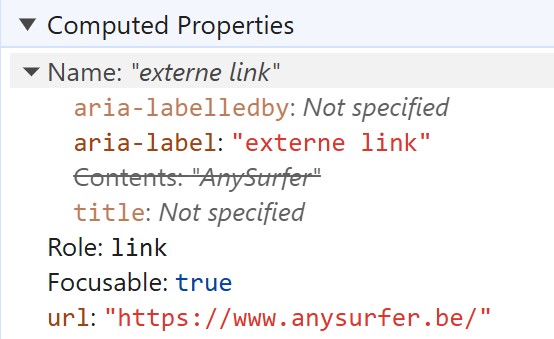
When we inspect the code and look at the computed properties in the accessibility tree, the hierarchy becomes clear: highest priority is aria-labelledby which is empty in this case. Then follows aria-label: External link. Only then follows the implicit link text which has been dropped because it is overriden.
Further reading
- Not all HTML-elements can have a name: When an HTML-element indicates “naming prohibited”, it can not have an aria-label (except when it received another role).
- Providing accessible names (ARIA practice guide).
Comments
Be the first to comment